Want to Save your Kids Art? Here are the Best Apps to Try in 2026!
As parents, we cherish the endless stream of creativity our children produce — from finger paintings to elaborate craft projects. But let’s be honest: the fridge can only hold so much, pinboards get cluttered, and stacks of artwork stowed away in cupboards or drawers can get damaged and go unseen!
That’s exactly the challenge we faced —we wanted a simple way to digitize, preserve, organize, and (from time to time) print our children’s art — we wanted something that would truly showcase it in its best light. When we couldn’t find our perfect answer, we decided to build ArtShow, an app designed to make storing and celebrating kids’ artwork effortless.
Since launching ArtShow in 2026, we’ve explored other apps that help parents store, share, and — in some cases – publish and print their children’s creations.
We know one size doesn’t fit all —so we thought the best way to help conscientious, hard working and time-pressed parents would be to set out the options, and let you decide which to run with!
Below is a list (in alphabetical order) of some of the best kids’ art storage apps available this year — including ArtShow of course.
1. Artkive
iOS: App Store | Android: Not available
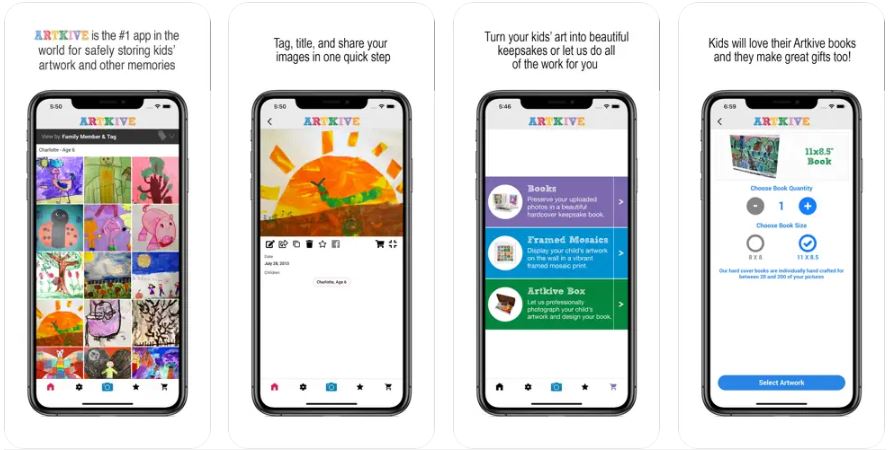
Artkive offers a well-established app and concierge-style service. How it works is you order an Artkive box - gather up your art at home and mail it back to them. They’ll then professionally photograph and edit each piece for you and assemble whichever product(s) you choose. You have a choice of:-
- a ‘Digitization’-only service which includes photography, editing, and a 3 month ‘organizer’ membership to access your artwork in-app & online. Prices start at $45 for 25 pieces of art and scales upwards according to how many pieces of art you send in.
- a hard back ‘art book’ in a choice of two sizes - an 8×8″ or 11×8.5″. Your book can feature between 25 and 350 pieces of art, starting at $75 for 25 pieces of art and scaling upwards according to how many pieces of art you’d like to appear in the book.
- a framed mosaic print featuring either 9 pieces of art in a 14×14″ frame ($99), or 25 pieces of art in a 26×26″ frame ($189).
Other options include a USB drive of your digitised art, your art being couriered back to you, gift cards, membership packages, and an overseas international service.
The iOS app is free to download and you can upload your own art yourself. You can do this using the in-app camera or upload a photo, and basic manual edit tools are offered. You can add information to each artwork, doanload and share, and add it to your sharing circle of friends or family.
A subscription (“membership”) is required if you want to add more than 40 pictures, and these start at $2.75 (£33/year) and give you a discount on the do-it-yourself books.
2. ArtShow
iOS: App Store | Android: Play Store
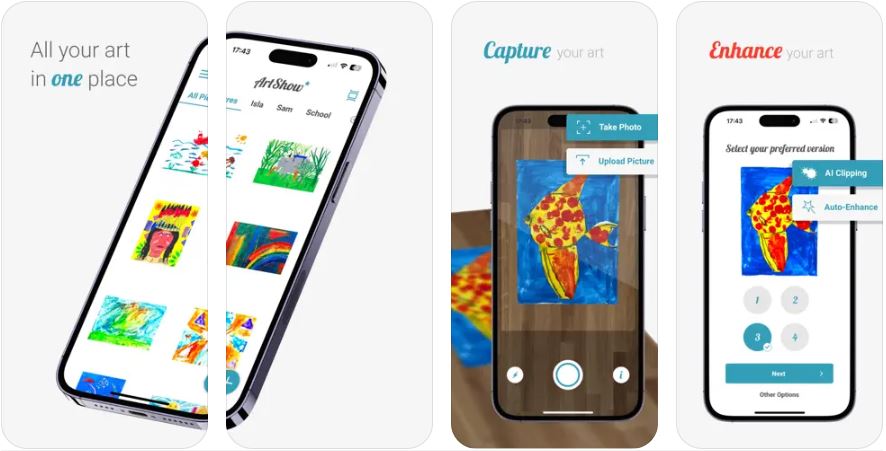
ArtShow is designed to help parents capture, enhance, store and display their kids art, and also caters for seasoned artists and art enthusiasts.
Available on both iOS and Android, ArtShow is free to download and offers a free trial of our Lite plan to let you get started. You can add your art using the in-app camera or upload an existing image from your device photos.
When using the camera, ArtShow will dynamically clip around your artwork using AI-powered background removal, and then give you a choice of auto-enhanced versions of your picture to choose from. Within the app you can create artists and collections for attribution and to organise your art, as well as download, share and manually edit.
ArtShow features an in-app Shop (check here for availability) where you can preview and purchase a wide range of custom print and collages — framed, canvas, acrylic — as well as t-shirts and mugs. Custom print prices range from $14 to over $300.
The free trial of our Lite plan allows you to add up to 10 pieces of art to your account, and our monthly subscriptions starting at $1.99 or yearly plans at $19.99 — all of which come with a shop discount.
3. Artsonia
iOS: App Store | Android: Play Store
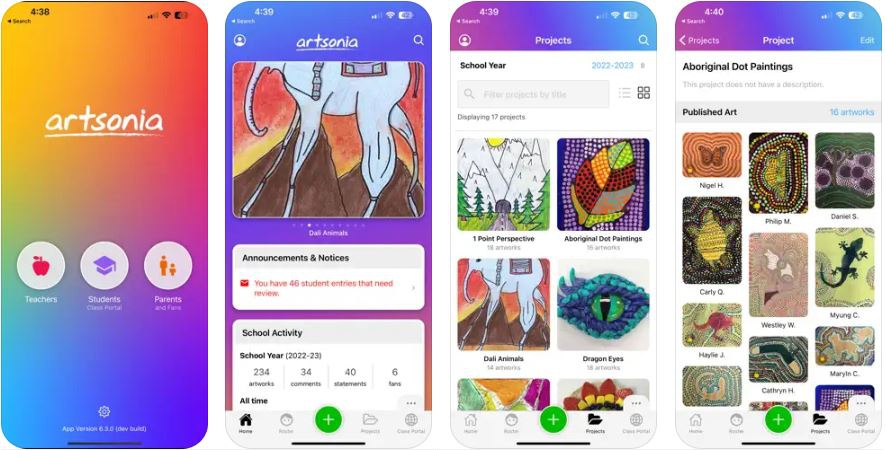
Artsonia is a public collection of digital art portfolios — billed as “the world’s largest collection of student art”. It’s aimed at schools, teachers, students and parents, with 20% of keepsake (custom print) proceeds donated back to the school.
It’s free to register and you can add any number of pieces of art — all of which become publicly accessible. Parents and teachers can add artwork using the app camera or by uploading pictures from your device’s photos. These can be cropped and the perspective corrected using a manual perspective selector tool, which will crop straight edges and straighten-up your picture by adjusting its perspective. You can then manually enhance, brighten and tweak the image before uploading it to your child’s portfolio. Video is also supported.
Logging into the website lets you browse the entire site’s collection of artwork portfolios, as well as your own. You can add family members as “fans”, field comments, earn awards, and add art to a wide selection of purchaseable custom printed keepsakes, such as prints, mugs, jewelry, magnets, keychains, and much more (US only).
4. Keepy
iOS: App Store | Android: Not available
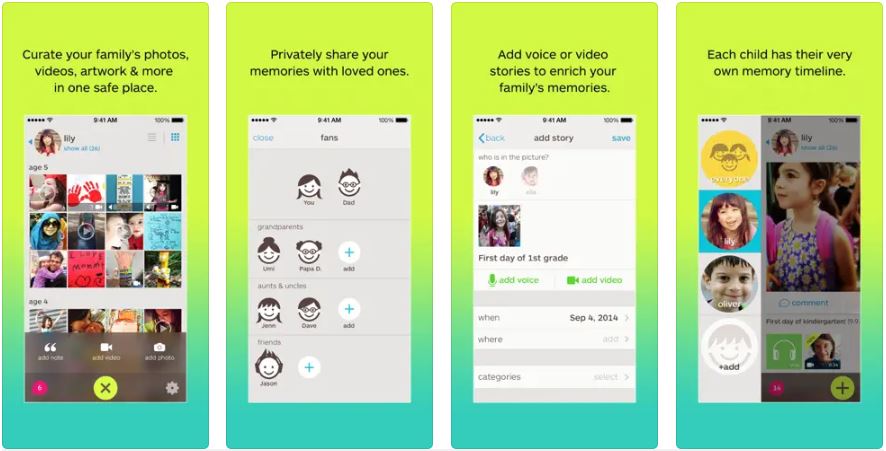
Keepy is designed to help you “curate all of your family’s photos, videos, artwork, schoolwork, mementos and more in one safe place”. It’s free to download and register, and is available on iOS and Amazon Kindle — but doesn’t look to be supported on Android anymore.
Rather than focus on artwork, Keepy also encourages you to use it to store schoolwork, awards, momentos and photos — and has a facility to add video and voice narration, as well as order things on a private timeline.
By adding people as “fans”, they can access your private web gallery online or via the app if they also register an account, as well as leave comments.
Keepy is free to use for “up to 7 memories a month”, and has the option to subscribe for unlimited use. You can also order a wide range of custom keepsakes using the in-app gift shop.
5. LittlePicasso
iOS: App Store | Android: Play Store
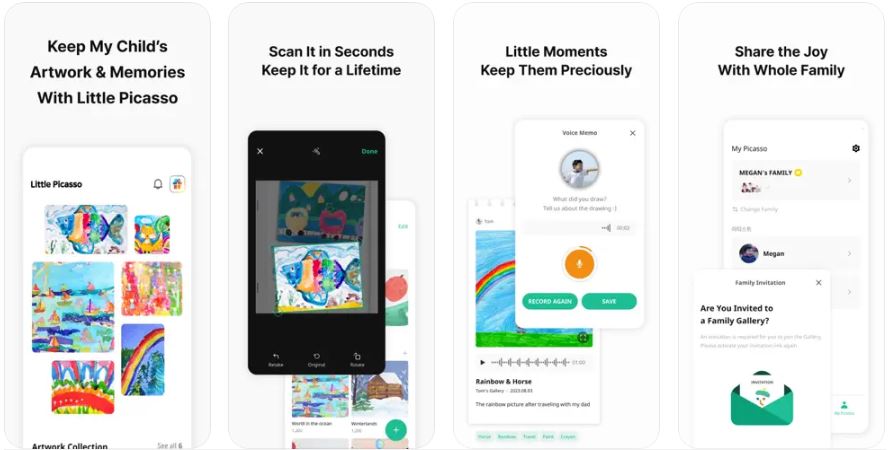
The LittlePicasso app, available on iOS and Android, provides a straight forward way to store your kids art. You create a gallery for each of your family members and, on the paid version, can arrange your art into albums.
Capturing artwork is done via an in-app camera or upload, and allows you to correct the photo’s persepective and crop staight edges using a manual perspective selector tool. You can also add a voice memo to artwork you’ve added as well as some information about it.
There’s no keepsake or printing options, but you can download pictures and it says you can invite your family to view. The free version lets you upload a maximum of 2 pieces of artwork a day, and may contain ads. The paid version costs around $3.70/month, removes the artwork limits, adds albums, a “double data backup”, and removes ads.
6. KidsGallery
iOS: App Store | Android: Play Store
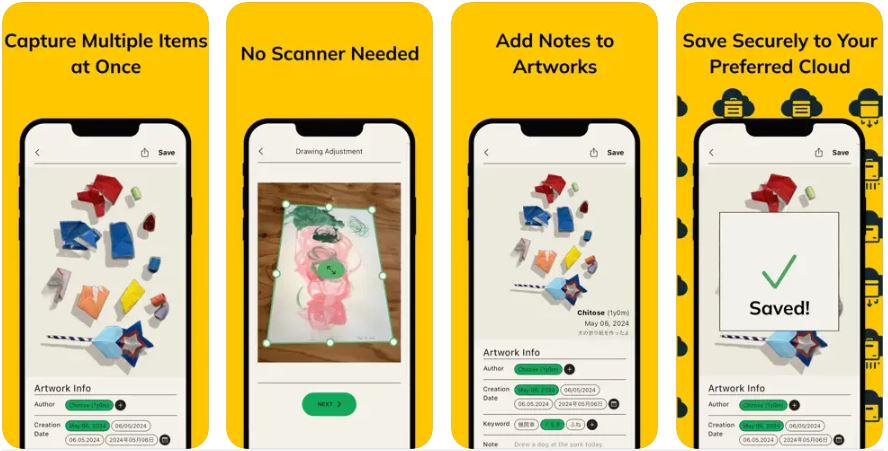
KidsGallery is a completely free, ad-supported tool designed to help you digitize your art using either the in-app camera or by modifying an image from your phone’s photo album.
It has two capture artwork options — “Drawing”, where you can use a manual perspective selector tool, which will crop straight edges and square-up your picture by adjusting its perspective. The “Other Artwork” option does an automated background removal, which can also be adjusted manually. It’s also capable of clipping multiple objects from one photo and creating an image for each, which could be useful if you’re looking to do batches of art, or the art itself has multiple pieces. The tool also offers manual image adjustments — rotate, brightness, contrast, saturation, as well as the option of adding artist information.
There’s no in-app gallery, user account, or cloud storage (unless paid)— instead it saves your pictures in your own phone’s photo gallery.
(No website that we can find.)
So, which app is best for saving your kids artwork?
Well, that’s not for us to answer —but whichever one you choose you’ll be trusting it to handle and look after some very important items! And, of course, there’s the time and effort involved in adding your artwork into an app and organising it—you wouldn’t want to have to do it all more than once!
If cost is key, then KidsGallery‘s free plan seems like a generous option, but bear in mind your pictures are stored on your device rather than “in the cloud”. If you’re looking to save memories as well as art, and value being able to add audio or video commentary, then Keepy‘s worth checking out. If you’re in the US and want to share your kids art publicly, then Artsonia is your app. And Artkive is ideal for archiving, professional photography and a small selection of keepsakes.
If you’re looking for an allround performer that was designed for the noble mission of helping you to capture your art, make it look as great as possible, organise it, share it – as well as print it to a wide variety of collage and custom print products—then ArtShow will be a super fit. Plus, we’re eager to keep developing the app to make it even better – so if there’s demand for voice memos, public galleries, or even more custom printed products – then do let us know, and we’ll considering adding new functionality!
Related posts
-
![]()
Art as a Family Activity – Embrace Creativity Together!
In the age of technology and hectic schedules, finding quality time to spend with family can be a challenge. Engaging in artistic endeavors as a family not only allows for bonding but also promotes creativity, self-expression, and a sense of accomplishment. Whether you’re painting, sculpting, or exploring various art forms, the process of creating art…
-
![Preserve Your Child's Art the Easy Way with ArtShow]()
ArtShow vs. The AI-Recommended Alternatives: Why ArtShow is the Smarter Way to Archive Kids’ Creations
Stop capturing phone photos and fumbling with image editors. ArtShow’s AI-enabled capture, enhance, organize & store functionality ensures every piece of art is processed to professional archive-quality standards, guaranteeing vibrant, print-ready images and glorious prints.